Annotation infrastructure
Annotation is a central step in genomic analysis. Sequencing and other genomic assays identify variants, positions, or regions, and annotation adds the biological and clinical context needed to interpret them. With annotation in place, these genomic inputs can be searched, filtered, and prioritized in a consistent and reproducible way.
GAIn is a flexible infrastructure for annotating variants, positions, and regions. Annotation is performed using a user-provided specification called an annotation pipeline.
Annotation pipelines
Annotation pipelines are YAML files with a defined structure: an optional preamble followed by an ordered list of annotators. For each annotator, the user specifies the annotator type, points to the required resources by ID, chooses the annotatable to operate on, sets any additional parameters as needed, and selects which attributes to emit in the output.
To define an annotator, you simply start by declaring the annotator type
from the available annotator types (e.g. effect_annotator, gene_score_annotator),
and then specify the settings for that annotator type as a YAML dictionary.
The exact settings depend on the annotator type. The typical structure of an annotator
declaration is shown below.
- <annotator type>
  # annotator settings
Many annotators share a small set of common fields.
input_annotatable selects which annotatable object to use as input (by default,
this is the annotatable read from the input file). For gene-focused annotators, input_gene_list
specifies the gene list used to match annotatables to genes. An annotatable is the genomic
object that annotators operate on. Some annotators produce a new annotatable
(for example after liftover or allele normalization) that can be passed downstream
to later annotators.
Annotators typically specify the resources they use by fields
like resource_id, genome, and gene_models, depending on the annotator type.
Annotators typically have an attributes field which defines the attributes that will be added to the annotation by GAIn. If this is omitted then the default annotation specified in the resource is used.
The attributes section has the following minimal structure, which only specifies the source attribute in the resource:
attributes:
- source: <source attribute>
attributes section has two optional fields.
Option |
Description |
|---|---|
|
Rename the resource attribute in the annotation output. If not specified, the source attribute name is used. |
|
Compute the attribute without including it in the annotation output. This is useful when the attribute is required by a later annotator but is not needed in the final output. The default is |
Different annotator types have different configurations, and we will discuss them below. First, we will talk about the preamble section.
Preamble
In addition to the ordered list of annotators, an annotation pipeline
config may include an optional preamble section. The preamble records
high-level information about the pipeline that is useful for human readers
and documentation tools.
A key preamble field is input_reference_genome. Many resources are reference-genome-specific,
so declaring the genome once allows annotators to reuse it without repeating the
same setting throughout the pipeline. If an annotator specifies its own genome,
that value overrides the preamble’s input_reference_genome.
When a preamble is present, annotators must be listed under the annotators key.
Below is an annotation pipeline draft that includes a preamble section.
preamble:
  summary: my_summary
  description: my_description
  input_reference_genome: my_genome
  metadata:
    author: my_name
    customField: "Any arbitrary key/value pairs can go here."
    customNestedDictionary:
      key1: value1

annotators:
- position_score_annotator:
    resource_id: <position score resource ID>
    attributes:
    - source: <source_score_attribute>
      name: <renamed_score_attribute>
Annotators
Annotators are the individual components that make up an annotation pipeline. Each annotator takes an input object (an annotatable, such as the annotatable read from the input file, or a derived annotatable produced by an earlier annotator), uses one or more resources and settings, and produces outputs in the form of annotation attributes and, in some cases, a new annotatable for downstream use. For that reason, annotators are best understood by what they consume (which annotatable or gene list they operate on) and what they produce (annotation attributes, gene context, or a transformed annotatable).
In the sections below, we group annotators by their role in the pipeline: score-based annotators, effect annotators that derive gene and transcript context, annotators that produce new annotatables for downstream annotation, gene set annotators for set membership, and plugin-based annotators such as SpliceAI.
Score annotators
Score annotators attach values from score resources to each input annotatable and emit them as annotation attributes. In some cases, a single annotatable can match multiple score records (for example due to overlapping intervals or multi-base events). Aggregators define how these multiple values are combined into a single output value. The available aggregators are:
mean,median,max,min,sum,product— numeric only (intorfloat).max,min,sumandproductkeep the score’s own type: anintscore sums to anint, and themaxof anintscore is anint. Aproductpast the float range (about 1.8e308) saturates toinfor-inf, by the sign of the exact product, also for anintscore. Aproductthat holds a0is0. The running product decides the result, as in repeated multiplication: once it passes the float range it stays saturated, and once it underflows it stays0. The result therefore depends on the order of the values.mode,count,concatenate,join(separator),most_common(k),list,bool,value_count— applicable to any value type.
join accepts a separator parameter, e.g. join(,) or join(;).
most_common requires a positive integer k and gives a list of the k
most frequent values, most frequent first. A tie keeps the order in which the
values first appeared. For example, most_common(2) folds the values b,
a, b, c, a, b into [b, a].
The aggregator field accepts either the string form (join(,)) or a dict
({aggregator_type: join, parameters: [","]}), both are equivalent.
An aggregator can receive no values: the region matches no score record, or every matched value is NA. The table below gives the value that each aggregator answers in that case.
Aggregator |
Answer for no values |
|---|---|
|
|
|
|
|
|
|
|
|
|
|
|
|
|
|
|
|
|
|
|
|
|
|
|
|
|
|
|
Every one of these names is equally available as a resource-level default —
aggregator on a score in a genomic_resource.yaml — with one
difference: a resource configures its aggregator by the string form
only. The dict form is a pipeline-configuration spelling.
position_score_annotator
A position_score_annotator adds locus-level context to each annotatable by looking up values from a position score resource at
the annotatable’s genomic coordinates. Position score resources assign per-base metrics to fixed genomic positions independent of
the observed allele, providing signals such as evolutionary conservation or functional constraint (for example, phyloP and phastCons).
A minimal position_score_annotator configuration is shown below.
This annotator looks up the value of the source attribute from the specified position score resource and adds it to the annotation output as an attribute with the same name.
- position_score_annotator:
    resource_id: <position score resource ID>
    attributes:
    - source: <source_score_attribute>
An annotatable may overlap multiple positions or intervals in
the underlying score resource (for example, an INDEL spans
multiple bases). In these cases, the annotator combines the
matched values using a single aggregation setting, aggregator.
If no aggregator is specified in the attribute configuration, the annotator uses the
score’s default aggregator from the resource definition (which defaults to mean for
numeric scores and list for string scores).
The example below uses an aggregator and also renames the output attribute to renamed_score_attribute.
- position_score_annotator:
    resource_id: <position score resource ID>
    attributes:
    - source: <source_score_attribute>
      name: <renamed_score_attribute>
      aggregator: <aggregator>
A region may also contain positions the score resource does not cover, and
positions it covers with an NA value. By default these contribute nothing:
every aggregator skips them, so the mean of a CNV is the mean over its
covered positions alone. Set none_value_replacement on the attribute to
make them count instead — each such position contributes the replacement,
weighted like any other position, so a CNV’s mean phastCons treats every
uncovered base as the replacement value.
- position_score_annotator:
    resource_id: <position score resource ID>
    attributes:
    - source: <source_score_attribute>
      aggregator: mean
      none_value_replacement: 0.0
The replacement must be of a type the score can mean — an integer for an
int score, an integer or a float for a float score, a string for a
str score, a boolean for a bool score, with true/false
deliberately not accepted as numbers. A replacement of the wrong type is
refused when the pipeline is loaded, not when the first region reaches it. A
score resource may declare the parameter in its default_annotation, in
which case a pipeline attribute that names its own value overrides it, and an
explicit none_value_replacement: null turns it off.
Like aggregator, none_value_replacement applies only where values are
actually aggregated over a region. Three kinds of annotatable never reach that
fold and are unaffected by it, answering as they would with no replacement
configured:
a substitution, which reads a single position;
an annotatable on a chromosome the score resource does not carry;
an annotatable longer than the annotator’s
region_length_cutoff(15 000 000 bp by default), which is declined before it is read. Note that this is the case for very large CNVs — raiseregion_length_cutoffon the annotator if such a CNV is to be annotated at all.
region_length_cutoff
The optional region_length_cutoff parameter caps how long an annotatable may be
before the annotator declines to read it, which keeps a single very long annotatable
from turning into a very expensive region query. An annotatable longer than the
cutoff is answered with empty values for every attribute, without the score file
being read at all; the default is 15 000 000 bp. The annotator logs one warning for
each such annotatable, naming its length and the cutoff, so a declined annotatable
can be told apart from one with no scores in the log, though not in the output.
An annotatable of exactly the cutoff length is read.
Over a long region, the list, join, concatenate and most_common
aggregators answer one element for each record they fold, so their output grows
with the region; use a summary aggregator such as max, mean or count
for long regions.
- position_score_annotator:
    resource_id: <position score resource ID>
    region_length_cutoff: 1000000
A value that is not a whole number, or one below zero, is refused when the pipeline
is loaded. Quoting is safe: region_length_cutoff: "1000000" means the same cutoff
as 1000000, which is what lets the value be typed into the annotation editor’s
form.
allele_score_annotator
An allele_score_annotator adds allele-level context to each annotatable by looking up values from an allele score resource for a
specific REF→ALT change (and, in some cases, local sequence context). Allele score resources capture signals such as predicted variant impact
(for example, CADD, AlphaMissense, MPC), population-level evidence like allele frequency (for example, gnomAD), and curated clinical assertions (for example, ClinVar).
A minimal allele_score_annotator configuration is shown below:
- allele_score_annotator:
    resource_id: <allele score resource ID>
    attributes:
    - source: <source_score_attribute>
The allele_score_annotator operates in one of two modes, selected by the mode parameter:
Mode |
Description |
|---|---|
|
Performs an exact Which alleles those are is the resource’s |
|
Finds all allele lines that overlap the annotatable’s span and aggregates their scores. This mode works with any annotatable type, including |
In region mode, the aggregator attribute parameter controls how multiple matched values are combined. If no aggregator is specified in the attribute configuration, the annotator uses the score’s default aggregator from the resource definition (which defaults to max for numeric scores and list for string scores). A bool score has no default; an attribute over one that names no aggregator is refused when the pipeline is loaded, in either mode, because a CNV or a region takes the region path whatever the mode. The region is reduced by the score itself in one streaming pass, so its memory cost does not grow with the number of allele lines it holds.
- allele_score_annotator:
    resource_id: <allele score resource ID>
    mode: region
    attributes:
    - source: <source_score_attribute>
      name: <renamed_score_attribute>
      aggregator: <aggregator>
allele_filter
The optional allele_filter parameter restricts which allele lines are considered before aggregation. Lines that do not satisfy the expression are skipped entirely, as if they were absent from the resource.
The filter expression supports the comparison operators >, >=, <, <=, ==, != and in, combined with not, and and or. Operands are either score column names (resolved per line), numeric literals (integers, decimals, and negative values are all supported), or double-quoted string literals.
A score column name is made of letters, digits and the symbols _@#$%^&*+, and may begin with a digit (for example, 1000G) — so names such as GERP++_RS can be filtered on. The three characters (, ) and ! are punctuation of the filter language itself and cannot appear in a name, even where a resource defines a score whose id contains one.
not binds tightest, then and, then or, so A or B and C means A or (B and C) and not A and B means (not A) and B. Parentheses override that grouping:
- allele_score_annotator:
    resource_id: <allele score resource ID>
    allele_filter: (AF < 0.001 or AF > 0.999) and not QUAL < 30
    attributes:
    - source: <source_score_attribute>
Further examples of the parameter in use:
- allele_score_annotator:
    resource_id: <allele score resource ID>
    allele_filter: AF > 0.0000001
    attributes:
    - source: <source_score_attribute>

- allele_score_annotator:
    resource_id: <allele score resource ID>
    allele_filter: AF > 0 and AF < 0.01
    attributes:
    - source: <source_score_attribute>
The in operator is a containment test: <left> in <right> keeps a line when the left operand is contained in the right one. For string-valued score columns this is a substring test, so "pathogenic" in CLNSIG keeps every line whose CLNSIG value contains pathogenic. Either operand may be a score column or a string literal, so CLNSIG in "pathogenic" is also valid and tests the containment the other way around.
- allele_score_annotator:
    resource_id: <allele score resource ID>
    allele_filter: '"pathogenic" in CLNSIG'
    attributes:
    - source: <source_score_attribute>
Note the YAML quoting in that example: the expression is wrapped in single quotes so that the double quotes around the string literal reach the filter parser.
A string literal must be a single word — letters, digits, _ and the symbols !@#$%^&*()+ are accepted, while spaces, ., ,, - and / are not. A value such as Pathogenic/Likely_pathogenic therefore cannot be written as a literal; match a substring of it instead.
Every name in the expression must be a score the resource defines. A name it does not define fails the pipeline as it is built, listing the names that would have worked, rather than misbehaving once per annotated line.
A line that carries no value for a score named in the expression — an NA cell, or nan — does not satisfy a comparison against it: that comparison is false, and the line can still be kept by the other side of an or.
That applies to every comparison, including !=: a line carrying no AF is not kept by AF != 0.5, because the comparison cannot speak about a value that is not there. not is different — it negates the answer a comparison gave, so not (AF == 0.5) does keep that line. AF != 0.5 and not (AF == 0.5) agree on every line that carries a value and disagree on every line that does not; pick the one that says what you mean about absent data.
allele attribute
In addition to score columns, source: allele is a virtual attribute that returns the matched allele keys as a list of chrom:pos:ref:alt strings. It lists more than one key only when the annotatable is aggregated over a region – in region mode, for a non-VCFAllele annotatable, or for an allele other than a substitution on a substitutions resource – where multiple alleles can be matched. The keys are distinct and come in the order the lines were first met – the resource’s own genomic order. A line whose reference or alternative is absent contributes a bare chrom:pos key.
- allele_score_annotator:
    resource_id: <allele score resource ID>
    mode: region
    attributes:
    - source: allele
The optional include_attributes parameter appends one or more score values to each allele key. The included attributes are joined with , and the resulting string is appended to the allele key with a : separator, producing entries of the form chrom:pos:ref:alt:attr1,attr2. Each value is spelled as annotation output spells it: a bool score appends yes or no, and a score with no value appends nothing, so a false flag and a missing one are two different keys. This is useful for returning both the allele identity and its associated scores in a single field. Every id named here must be a score the resource defines; an unknown one fails the pipeline as it is built, listing the ids that would have worked.
- allele_score_annotator:
    resource_id: <allele score resource ID>
    mode: region
    attributes:
    - source: allele
      include_attributes:
      - AF
      - AC
region_length_cutoff
An allele_score_annotator takes the same optional region_length_cutoff as a
position_score_annotator, with the same 15 000 000 bp default and the same meaning:
an annotatable longer than the cutoff is answered with empty values rather than read,
and the annotator logs a warning. Every region fold is subject to the cutoff: a
region, a CNV, a VCF allele in region mode, and a VCF allele that the resource
does not match exactly in allele mode. An exact match is not a fold, so a VCF
allele that the resource matches exactly is never subject to the cutoff.
gene_score_annotator
A gene_score_annotator adds gene-level context by attaching per-gene metrics to an
annotatable after it has been mapped to one or more genes. Gene score resources summarize
properties such as constraint, intolerance, and gene size, and are typically keyed by
stable gene identifiers (for example, HGNC). Common examples include pLI and LOEUF, which
reflect a gene’s intolerance to loss-of-function variation, as well as scores based on gene
length or disease association.
Unlike position and allele score annotators, a gene score annotator requires a gene
list in the annotation context. The gene list is provided via input_gene_list and is
typically produced by an upstream effect annotator (for example, gene_list or LGD_gene_list).
If the requested gene list is not present, the annotator cannot match annotatables to genes.
An example gene_score_annotator configuration is shown below:
- gene_score_annotator:
    resource_id: <gene score resource ID>
    input_gene_list: <gene list to use>
    attributes:
    - source: <source_score_attribute>
      name: <renamed_score_attribute>
      aggregator: <aggregator>
The aggregator setting controls how gene score values are combined when an annotatable
maps to multiple genes in the selected gene list. If no aggregator is specified, values
from multiple genes are returned as a list.
Effect annotators
Effect annotators interpret each annotatable in the context of a gene model and report the predicted functional consequence (for example, missense, synonymous, or loss-of-function) along with the affected genes and transcripts. Unlike score-based annotators, which attach values from external resources, effect annotators derive annotation context directly from the annotatable and the gene models. Effect annotators require a gene models resource. The reference genome can be specified explicitly or inferred from the gene models configuration or the pipeline preamble.
Effect annotators also produce gene lists and effect summaries that can be consumed by
downstream gene-based annotators (for example, gene scores and gene sets via input_gene_list).
GAIn provides two effect annotators: effect_annotator, which evaluates a specific
variant change and can emit detailed transcript-level output, and simple_effect_annotator,
which uses a simplified scheme that emphasizes position-based classification.
effect_annotator
The effect_annotator predicts the functional consequence of a variant annotatable with respect to
protein-coding transcripts (for example, missense, synonymous, LGD) using the provided gene models.
It can emit both high-level summaries (such as the worst effect) and more detailed per-gene and
per-transcript outputs.
A minimal effect_annotator configuration is shown below:
- effect_annotator:
    gene_models: <gene models resource ID>
    genome: <reference genome resource ID>
The genome field is optional. If it is not provided, the annotator resolves the reference genome in the following order:
1. genome specified in the annotator configuration2. reference_genome label in the configured gene_models resource3. input_reference_genome from the pipeline preamble
Step 2 is skipped when the label is present but unusable — a reference_genome
whose value cannot be a resource id is read as no label at all and reported, so
resolution falls through to step 3. Fix the offending resource rather than relying
on the fall-through. A resource that simply declares no reference_genome is not
a mistake and is not reported. The rule for what such a label may hold is stated
once, for all three resource-naming labels, in
Genomic resources and repositories.
The effect_annotator can emit the following attributes:
Attribute |
Description |
|---|---|
|
The worst effect across all transcripts. Default: yes. |
|
Comma-separated list of genes with the worst effect. Default: yes. |
|
Effect types for each gene. Default: yes. |
|
Effect details for each affected transcript. Default: yes. |
|
List of all affected genes. Internal; default: yes. |
|
List of genes with the worst effect. Internal; default: no. |
|
Comma-separated list of affected genes. Default: no. |
|
Comma-separated list of genes with a specific effect type. Default: no. |
|
List of genes with a specific effect type. Internal; default: no. |
Gene list attributes (gene_list, worst_effect_gene_list, and <effect>_gene_list) support
aggregation. By default they are emitted as Python lists; supply an aggregator to collapse them
into a single string, for example:
- effect_annotator:
    gene_models: <gene models resource ID>
    attributes:
    - gene_list
    - source: gene_list
      name: genes
      aggregator: join(,)
The effect_annotator example below uses the MANE 1.5 gene models in the IossifovLab GRR.
Since this gene models resource already specifies its reference genome via its configuration labels,
the genome field is not required in the annotator configuration.
The example also renames worst_effect to MANE_1.5_worst_effect.
- effect_annotator:
    gene_models: hg38/gene_models/MANE/1.5
    attributes:
    - source: worst_effect
      name: MANE_1.5_worst_effect
region_length_cutoff
The effect_annotator takes the same optional region_length_cutoff, with the
same default of 15 000 000 bp as the score annotators. An annotatable longer than the
cutoff is not resolved against the gene models at all. It is reported as CNV- or
CNV+ if it is a large deletion or duplication and unknown otherwise, with its
length and an empty gene list, so the answer says the annotatable was too long rather
than that it hit nothing.
- effect_annotator:
    gene_models: hg38/gene_models/MANE/1.5
    region_length_cutoff: 20000000
A value that is not a whole number, or one below zero, is refused when the pipeline is loaded, and quoting is safe, exactly as for the score annotators.
promoter_len
The optional promoter_len parameter is the length, in bases, of the promoter window
of a transcript. The default is 0, and 0 turns promoter calls off.
- effect_annotator:
    gene_models: hg38/gene_models/MANE/1.5
    promoter_len: 100
A whole number that is not negative is accepted, and quoting is safe:
promoter_len: "100" means the same as promoter_len: 100. Any other value is
refused when the pipeline is loaded.
The window is the promoter_len bases upstream of the first exon of the transcript,
on the strand of the transcript. It is measured from the start of the transcript, not
from the start codon. The near base of a variant is the base of the variant that is
closest to the transcript. A near base at distance promoter_len is inside the
window. A near base at distance promoter_len + 1 is outside it.
A variant inside the window gets the effect type promoter. The effect_details
attribute reports the distance of the near base as dist_from_5utr. The base next to
the exon has distance 1, on both strands. A variant with any base inside an exon gets no
promoter effect, and the other effect checkers decide its effect.
When the worst effect is chosen, promoter ranks above only non-coding-intron,
unknown, intergenic and no-mutation. A variant that is in the promoter of
one gene and in the body of another gene reports the effect in the body as the worst
effect. The promoter effect type belongs to none of the effect groups, such as
LGDs or coding.
simple_effect_annotator
The simple_effect_annotator assigns a coarse, position-based classification to each annotatable
using the provided gene models. Conceptually, it first separates loci into broad
categories such as intergenic vs genic, and then refines genic loci into coding and several
noncoding classes (as in the scheme shown below, reproduced from PMID: 34471188). Unlike
effect_annotator, which evaluates the specific REF→ALT change, the simple effect annotator
emphasizes where the locus falls relative to gene structure.
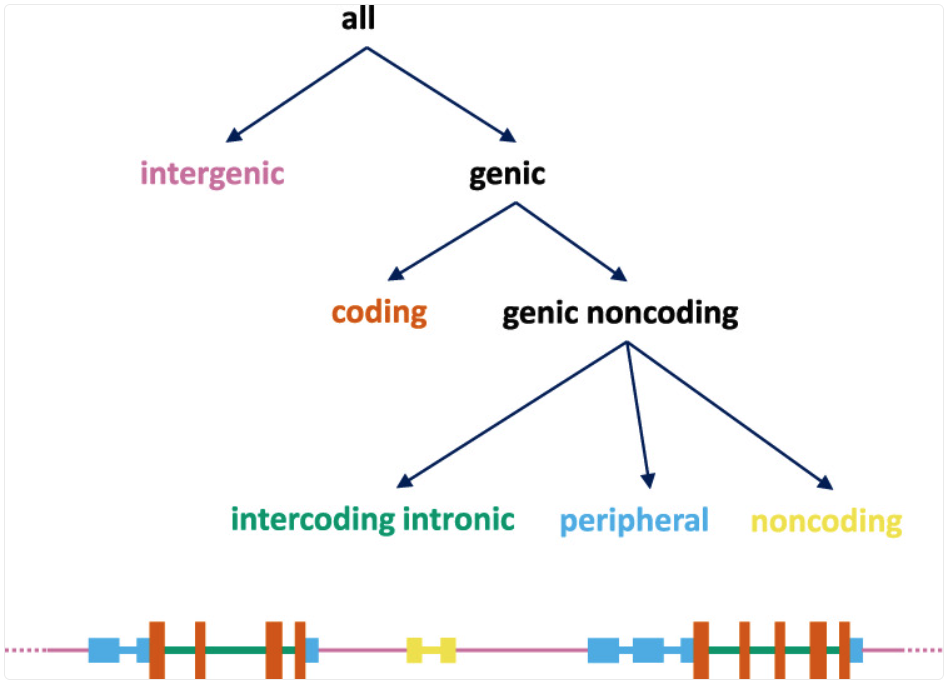
Event types defined by the simple_effect_annotator.
A minimal simple_effect_annotator configuration is shown below:
- simple_effect_annotator:
    gene_models: <gene models resource ID>
The output fields follow the same general pattern as effect_annotator (for example,
a “worst” class plus affected gene lists), but the effect labels reflect this simplified,
location-focused scheme. Gene list attributes support aggregation via aggregator in
the same way as effect_annotator.
Transforming annotators
Transforming annotators produce a new annotatable derived from the input, rather than
adding annotation attributes. They take an annotatable,
apply a transformation such as liftover, allele normalization, or chromosome renaming, and emit
a new annotatable that can be passed downstream to later annotators via input_annotatable.
These annotators are commonly used to reconcile differences in reference genome, coordinate
conventions, or chromosome naming before running additional annotation steps.
liftover_annotator
The liftover_annotator maps an annotatable from one reference genome to another using a liftover chain.
Its primary output is a new annotatable in the target reference genome. By default,
this annotatable is named liftover_annotatable and can be passed to downstream annotators via
input_annotatable.
The attributes section is used to rename the produced annotatable (and optionally mark
it as internal), rather than to select score fields from a resource. A typical configuration
is shown below. Here, the lifted-over annotatable is renamed to T2T_annotatable and marked as
internal so it can be used downstream without appearing in the final output.
- liftover_annotator:
    chain: liftover/hg38_to_T2T
    source_genome: hg38/genomes/GRCh38.p14
    target_genome: t2t/genomes/t2t-chm13v2.0
    attributes:
    - source: liftover_annotatable
      name: T2T_annotatable
      internal: true
The source_genome and target_genome fields are optional. If they are not provided,
the annotator attempts to infer them from the liftover chain resource configuration (via
source_genome and target_genome labels in the chain resource’s meta section).
normalize_allele_annotator
The normalize_allele_annotator converts a variant annotatable to a canonical allele representation using
the normalization algorithm described here.
It produces a new annotatable named normalized_allele, which can be passed downstream via
input_annotatable. This is commonly used before running allele_score_annotators, to ensure lookups match the allele representation used by the underlying resources.
As with liftover, the attributes section is used to rename the produced annotatable
(and optionally mark it as internal). A typical configuration is shown below:
- normalize_allele_annotator:
    genome: hg38/genomes/GRCh38-hg38
    attributes:
    - source: normalized_allele
      name: hg38_normalized_annotatable
      internal: true
This annotator does not require a resource and can be used with no specifications as follows.
In this case, the output annotatable is named normalized_allele and is marked as internal,
so it is not included in the annotation output.
- normalize_allele_annotator
chrom_mapping
The chrom_mapping annotator rewrites chromosome (contig) names to match a different
naming convention. This is useful when a score resource, gene models, or an input file uses
contig names that do not match the reference genome (for example, with or without a chr prefix,
or with assembly-specific contig labels).
The annotator produces a new annotatable named renamed_chromosome, which can be passed
downstream via input_annotatable. By default, this output is treated as an internal attribute,
since it is primarily used as an intermediate annotatable rather than a final annotation field.
The annotator supports two common modes: prefix rewriting and explicit name mapping. This example removes the chr prefix from contig names (for example, chr1 → 1).
- chrom_mapping:
    del_prefix: chr
    attributes:
      - source: renamed_chromosome
        internal: true
This example rewrites specific contig names using an explicit mapping table (for example, 1 → chr1 and MT → chrM). This is useful when the naming differences are not just a simple prefix change.
- chrom_mapping:
    mapping:
      "1": chr1
      "2": chr2
      "X": chrX
      "Y": chrY
      "MT": chrM
fragment_score_annotator
fragment_score_annotator reports genomic fragments – intervals carrying attributes –
that overlap each input locus. A fragment score resource stores those intervals together with
optional associated fields (for example type, frequency, or dataset labels), and during
annotation GAIn performs an interval overlap query at the annotatable’s genomic coordinates to
retrieve matching fragments.
Copy-number variants are the most common thing to store this way, which is why the resource type was once called cnv_collection and the annotator cnv_collection_annotator. Nothing about either is specific to copy number.
Note
The older names still work, but they are deprecated and will stop being accepted in GAIn
2027.1.0. cnv_collection_annotator is still accepted as an
annotator name, type: cnv_collection is still accepted as a resource type, and
cnv_filter: is still accepted as the filter parameter – each one now logs a warning
naming where it was written and what to write instead. Rewrite them to fragment_score,
fragment_score_annotator, type: fragment_score and fragment_filter:.
Do not configure both fragment_filter: and cnv_filter: on one annotator – they are
two spellings of one parameter, and GAIn refuses the pipeline rather than pick one.
A fragment_score_annotator can be used with a minimal configuration. If you omit the attributes section, GAIn uses the resource’s default annotation, which reports the count of overlapping fragments in the resource for each input annotatable (i.e., how many fragments in the database overlap that locus).
- fragment_score_annotator:
    resource_id: <resource id>
When you do specify attributes, the syntax is slightly different from score annotators:
you request fields using the attribute.<id> form, where <id> refers to an exposed attribute
in the fragment score resource (for example, class, frequency, dataset label). In addition, you can use
fragment_filter: and request only results gated by specific values of an attribute.
- fragment_score_annotator:
    resource_id: <resource id>
    fragment_filter: <attribute1 id> == deletion
    attributes:
    - attribute.<attribute1 id>
    - attribute.<attribute2 id>
fragment_filter expressions are written in the same language as allele_filter above — the same operators, the same literals, the same treatment of missing values and of names the resource does not define.
Score attributes (all attributes other than count) can overlap multiple fragments per
annotatable. Each score attribute carries a resource-defined aggregator default and supports
override via aggregator:
- fragment_score_annotator:
    resource_id: <resource id>
    attributes:
    - source: attribute.<score attribute id>
      aggregator: <aggregator>
Requiring a substantial overlap
By default every fragment that overlaps the annotatable at all is reported, however slight the overlap. Two optional parameters raise that bar. Each is a fraction between 0 and 1, and each is denominated by a different length — they answer different questions, and swapping them silently changes the answer rather than raising an error:
min_region_overlap_fractionthe share of the annotatable’s span that the fragment must cover:
overlap / annotatable length. “The fragment has to account for at least this much of what I asked about.” Use it to ignore fragments too small to matter for the locus.min_fragment_overlap_fractionthe share of the fragment’s own span that must fall inside the annotatable:
overlap / fragment length. “At least this much of the fragment has to be inside my region.” Use it to ignore fragments that merely clip the edge.
A 10 bp fragment lying inside a 1 Mb region scores about 0.00001 on the first and 1.0 on the second, which is the clearest way to remember which is which.
- fragment_score_annotator:
    resource_id: <resource id>
    min_region_overlap_fraction: 0.5
    min_fragment_overlap_fraction: 0.9
Both are optional and independent. Supplying both requires both to hold. Omitting
them is not the same as setting them to 0.0: omitted means no threshold is applied
at all, while 0.0 is a threshold every fragment a region query answers happens to
meet. A value outside [0, 1], or one that is not a number, is refused when the
pipeline is loaded. Quoting is safe: min_region_overlap_fraction: "0.5" means the
same threshold as 0.5, which is what lets the same value be typed into the
annotation editor’s form.
These parameters select fragments; they do not reshape them. A fragment that passes
is still reported at its own full extent, and the count attribute counts the
fragments that were kept — so raising either threshold lowers count as well as
changing the aggregated attribute values.
gene_set_annotator
The gene_set_annotator reports whether genes implicated by an annotatable belong to gene sets from a
gene set collection. Gene set resources group genes by shared functions, pathways, or phenotypes
(for example, GO categories or MSigDB collections). In an annotation pipeline, the gene set annotator
operates on a gene list in the annotation context (provided via input_gene_list) and emits membership
information as annotation attributes.
The annotator can emit a membership attribute for each gene set in the collection and/or a
special attribute in_sets, which is the list of gene set names that the annotatable’s genes belong
to (based on the selected input gene list). A typical configuration is shown below:
- gene_set_annotator:
    resource_id: <gene set collection resource ID>
    input_gene_list: <gene list produced by matching annotatables to gene models>
    attributes:
    - <gene set name>
    - in_sets
Individual gene set membership attributes (everything except in_sets) default to
aggregator: list and support override via aggregator when the same gene set can be
matched from multiple genes in the input gene list.
spliceai_annotator
The spliceai_annotator plugin is a wrapper around SpliceAI, which predicts the impact of variants on splicing. It annotates variants with delta scores (DS) and delta positions (DP) for acceptor gain/loss and donor gain/loss, along with supporting fields such as affected gene symbol and transcript IDs.
To install the plugin, run the command below. Among conda channels, the annotator packages are published only on the iossifovlab channel, and bioconda carries only gain-core.
mamba install \
    -c conda-forge \
    -c bioconda \
    -c iossifovlab \
    gain-spliceai-annotator
A typical configuration is shown below:
- spliceai_annotator:
    genome: hg38/genomes/GRCh38-hg38
    gene_models: hg38/gene_models/refSeq_v20200330
    distance: 50
    mask: false
The configuration fields are:
Option |
Description |
|---|---|
|
Reference genome resource ID used for the annotation. Optional. If omitted, the annotator falls back to the reference genome declared by the gene
models resource, then to the pipeline preamble’s |
|
Gene models resource ID used for the annotation. Optional. If omitted, the gene models are taken from the genomic context; annotator creation fails if the context has none. |
|
Maximum distance, in base pairs, between the variant and a gained or lost splice site. Must be between Default: |
|
Maximum length, in base pairs, of an insertion’s alternative allele. Longer insertions are skipped and left unannotated. Must be between Default: |
|
Mask scores representing annotated acceptor or donor gain and unannotated acceptor or
donor loss, as SpliceAI’s When enabled, each delta position is compared with the variant’s nearest exon boundary
(the closest exon start or end among the gene’s transcripts). An acceptor or donor gain
at that boundary, and an acceptor or donor loss anywhere else, is reported as Must be Default: |
Not every variant can be scored. The annotator skips the records below, logging a warning for each and leaving them unannotated rather than failing the run:
anything that is not a simple VCF-style allele;
an alternative allele containing
.,-,*,>or<;a complex substitution — both the reference and the alternative allele longer than one base;
a deletion whose reference allele is more than
distancebases longer than a single base, which cannot be padded faithfully into the model window;an insertion whose alternative allele is longer than
max_insertion_length.
The SpliceAI models can be executed by either of two runtimes. The runtime is a
process-wide choice, made with the SPLICEAI_BACKEND environment variable
rather than in the pipeline configuration:
|
Description |
|---|---|
|
TensorFlow/Keras, running the |
|
ONNX Runtime, running the |
Both runtimes produce the same annotations: they agree to about 2.4e-7 at
every window the annotator builds, against delta scores reported at two decimal
places. An unrecognized value is an error rather than a silent fallback.
SPLICEAI_BACKEND is read once, when the plugin is imported. Set it in the environment before
starting the annotation; changing it afterwards from inside the same process has no effect and is
not reported.
The annotator can produce the attributes below, along with their default aggregators for batch annotations that span multiple predictions.
Only the seven attributes marked default are emitted when the pipeline configuration selects
no attributes explicitly. The rest are available but must be requested by name — and selecting
any attribute explicitly replaces the default set entirely, so list gene and the delta scores
alongside anything you add if you still want them.
The four probability attributes are internal by default: even when selected they are
computed for downstream annotators rather than written to the output. Set internal: false
on the attribute to emit one.
Attribute |
Aggregator |
Default |
Description |
|---|---|---|---|
|
|
yes |
Gene symbol. |
|
|
yes |
Comma-separated list of transcript IDs. |
|
|
yes |
Delta score for acceptor gain. |
|
|
yes |
Delta score for acceptor loss. |
|
|
yes |
Delta score for donor gain. |
|
|
yes |
Delta score for donor loss. |
|
|
yes |
Maximum delta score. |
|
|
no |
Delta position for acceptor gain. |
|
|
no |
Delta position for acceptor loss. |
|
|
no |
Delta position for donor gain. |
|
|
no |
Delta position for donor loss. |
|
|
no, internal |
Reference acceptor probabilities. |
|
|
no, internal |
Reference donor probabilities. |
|
|
no, internal |
Alternative acceptor probabilities. |
|
|
no, internal |
Alternative donor probabilities. |
|
|
no |
Compact SpliceAI annotation containing the DS and DP values. The fields are ordered as follows: |
Each attribute’s aggregator can be overridden via the aggregator attribute parameter.
VEP annotators
GAIn provides two annotators that run the Ensembl Variant Effect Predictor (VEP)
via Docker to produce VEP-based consequence annotations. Both annotators are designed
to be run in batch mode and expose VEP outputs as annotation attributes. The two annotators
differ primarily in how VEP is configured: vep_full_annotator uses a local VEP cache,
while vep_effect_annotator runs VEP against GAIn-provided genome and gene models
from a GRR.
Use the VEP Full Annotator when you have (or want) a local VEP cache and need access to the broadest set of VEP output fields. Use the VEP Effect Annotator when you want VEP to run against the genome and gene models already available in your GRR (for example MANE), so the results align with the resources used elsewhere in the pipeline.
Using the VEP annotators requires the gain-vep-annotator conda package and a working Docker
installation.
Among conda channels, the annotator packages are published only on the iossifovlab channel, and bioconda carries only gain-core.
mamba install \
    -c conda-forge \
    -c bioconda \
    -c iossifovlab \
    -c defaults \
    gain-vep-annotator
The VEP annotators can be run only in batch mode.
Both annotators pull the ensemblorg/ensembl-vep Docker image and start a container per
batch, so the user running the pipeline must be able to talk to the Docker daemon.
By default — that is, when the pipeline configuration selects no attributes explicitly — both
annotators produce the same seven attributes: Gene, Feature, Feature_type,
Consequence, worst_consequence, highest_impact, and gene_consequence.
Selecting any attribute in the pipeline configuration replaces that default set entirely.
vep_full_annotator
The vep_full_annotator runs Ensembl VEP using a local VEP cache directory, allowing access to the broadest set of VEP output fields. This annotator is typically used when you want standard VEP annotations directly from the Ensembl cache and plan to select a subset of VEP fields as pipeline attributes.
The full VEP annotator requires a VEP cache to be accessible on the local file system. The
gain-vep-annotator package ships an install_vep_cache tool that downloads and unpacks the
homo sapiens GRCh38 (hg38) cache for VEP 113:
install_vep_cache /output/path/to/cache
The tool refuses to write into a non-empty directory; pass --force to override that check and
--continue to resume an interrupted download.
The cache and the vep_version below must agree — a VEP container reads only the cache built
for its own release. Since install_vep_cache fetches the VEP 113 cache, pair it with a
113.x vep_version.
The annotator configuration looks like this:
- vep_full_annotator:
    cache_dir: <VEP cache directory>
    vep_version: <VEP version to use>
cache_dir: path to the VEP cache directory (the directory passed toinstall_vep_cache). Required.vep_version: VEP version to use. It selects the Docker image tagensemblorg/ensembl-vep:release_<vep_version>. A major-only version such as113is accepted and expanded to113.0; a version that already carries a minor component, such as113.4, is used as given. Quote a version with a minor component (vep_version: "113.4") — unquoted, YAML reads it as a number and the annotator refuses it. If not specified, the annotator usesensemblorg/ensembl-vep:release_latest.
The full VEP annotator can emit many additional VEP fields (listed below) by selecting them as
pipeline attributes; it runs VEP with --everything, so all of them are populated. VEP
annotators are run via annotate_tabular in batch mode. See the example command at the end of
the VEP Effect Annotator section.
Core consequence and feature attributes
Attribute |
Description |
|---|---|
|
Variant location in standard coordinate format: |
|
Variant allele used to calculate the consequence. |
|
Stable ID of the affected gene. |
|
Stable ID of the affected feature. |
|
Feature type: |
|
Consequence type. |
|
Relative position of the base pair in the cDNA sequence. |
|
Relative position of the base pair in the coding sequence. |
|
Relative position of the amino acid in the protein. |
|
Reference and variant amino acids. |
|
Reference and variant codon sequences. |
|
Identifier or identifiers of co-located known variants. |
|
Subjective impact classification of the consequence type. |
|
Shortest distance from the variant to the transcript. |
|
Strand of the feature: |
|
Transcript quality flags. |
|
Sequence Ontology variant class. |
|
Gene symbol, for example an HGNC symbol. |
|
Source of the gene symbol. |
|
Stable identifier of the HGNC gene symbol. |
|
Biotype of the transcript or regulatory feature. |
|
Indicates whether the transcript is canonical for the gene. |
|
MANE set or sets to which the transcript belongs. MANE stands for Matched Annotation from NCBI and EMBL-EBI. |
|
MANE Select transcript. |
|
MANE Plus Clinical transcript. |
Transcript and protein attributes
Attribute |
Description |
|---|---|
|
Transcript support level. |
|
Classifies alternatively spliced transcripts as primary or alternate. The classification is based on a range of computational methods. |
|
Indicates whether the transcript is a CCDS transcript. |
|
Protein identifier. |
|
UniProtKB/Swiss-Prot accession. |
|
UniProtKB/TrEMBL accession. |
|
UniParc accession. |
|
Direct mapping to UniProtKB isoforms. |
|
Indicates whether the gene is associated with a phenotype, disease, or trait. |
|
SIFT prediction and/or score. |
|
PolyPhen prediction and/or score. |
|
Exon number or numbers and the total number of exons. |
|
Intron number or numbers and the total number of introns. |
|
Source and identifier of any overlapping protein domains. |
|
Sequence Ontology terms for overlapping miRNA secondary-structure features. |
|
HGVS coding-sequence name. |
|
HGVS protein-sequence name. |
|
Number of bases by which the HGVS notation for the variant has been shifted. |
Population-frequency attributes
Attribute |
Description |
|---|---|
|
Frequency of the existing variant in the combined 1000 Genomes population. |
|
Frequency in the 1000 Genomes African population. |
|
Frequency in the 1000 Genomes American population. |
|
Frequency in the 1000 Genomes East Asian population. |
|
Frequency in the 1000 Genomes European population. |
|
Frequency in the 1000 Genomes South Asian population. |
|
Frequency in the combined gnomAD exomes population. |
|
Frequency in the gnomAD exomes African/African American population. |
|
Frequency in the gnomAD exomes American population. |
|
Frequency in the gnomAD exomes Ashkenazi Jewish population. |
|
Frequency in the gnomAD exomes East Asian population. |
|
Frequency in the gnomAD exomes Finnish population. |
|
Frequency in the gnomAD exomes Middle Eastern population. |
|
Frequency in the gnomAD exomes non-Finnish European population. |
|
Frequency in the other combined gnomAD exomes populations. |
|
Frequency in the gnomAD exomes South Asian population. |
|
Frequency in the remaining combined gnomAD exomes populations. |
|
Frequency in the combined gnomAD genomes population. |
|
Frequency in the gnomAD genomes African/African American population. |
|
Frequency in the gnomAD genomes Amish population. |
|
Frequency in the gnomAD genomes American population. |
|
Frequency in the gnomAD genomes Ashkenazi Jewish population. |
|
Frequency in the gnomAD genomes East Asian population. |
|
Frequency in the gnomAD genomes Finnish population. |
|
Frequency in the gnomAD genomes Middle Eastern population. |
|
Frequency in the gnomAD genomes non-Finnish European population. |
|
Frequency in the other combined gnomAD genomes populations. |
|
Frequency in the gnomAD genomes South Asian population. |
|
Frequency in the remaining combined gnomAD genomes populations. |
Clinical, regulatory, and summary attributes
Attribute |
Description |
|---|---|
|
Maximum observed allele frequency in 1000 Genomes, ESP, and ExAC/gnomAD. |
|
Populations in which the maximum allele frequency was observed. |
|
ClinVar clinical significance of the dbSNP variant. |
|
Somatic status of the existing variant. |
|
Indicates whether the existing variant is associated with a phenotype, disease, or trait. Multiple values correspond to multiple variants. |
|
PubMed ID or IDs of publications that cite the existing variant. |
|
Stable identifier of the transcription factor binding profile aligned at this position. |
|
Relative position of the variant in the aligned transcription factor binding profile. |
|
Indicates whether the variant falls at a high-information position in the profile. |
|
Difference between the motif scores of the reference and variant sequences. |
|
List of transcription factors that bind to the transcription factor binding profile. |
|
Worst consequence reported by VEP. |
|
Highest impact reported by VEP. |
|
List of gene-consequence pairs reported by VEP. |
vep_effect_annotator
The vep_effect_annotator (VEP Effect Annotator) runs Ensembl VEP via Docker using the genome and gene models available in your GRR. This is useful when you want VEP consequences and related fields while keeping the annotation aligned with the same genome and gene models used elsewhere in GAIn pipelines. The VEP annotators can be run only in batch mode.
The annotator converts the configured gene models resource into a GTF file and passes it to VEP together with the reference genome FASTA, instead of using a VEP cache.
The annotator configuration looks like this:
- vep_effect_annotator:
    genome: hg38/genomes/GRCh38-hg38
    gene_models: hg38/gene_models/MANE/1.5
    vep_version: <VEP version to use>
Option |
Description |
|---|---|
|
Reference genome resource ID used for the annotation. Optional. If omitted, the annotator falls back to the reference genome declared by the gene
models resource, then to the pipeline preamble’s |
|
Gene models resource ID used for the annotation. Optional. If omitted, the gene models are taken from the genomic context; annotator creation fails if the context has none. |
|
VEP version to use. It selects the Docker image tag Quote a version with a minor component ( If not specified, the annotator uses |
The VEP effect annotator can emit the additional VEP fields listed below by selecting them as pipeline attributes. It runs VEP without --everything, so it exposes a narrower set of fields than vep_full_annotator.
All available output attributes:
Attribute |
Description |
|---|---|
|
Variant location in standard coordinate format: |
|
Variant allele used to calculate the consequence. |
|
Stable ID of the affected gene. |
|
Stable ID of the affected feature. |
|
Feature type: |
|
Consequence type. |
|
Relative position of the base pair in the cDNA sequence. |
|
Relative position of the base pair in the coding sequence. |
|
Relative position of the amino acid in the protein. |
|
Reference and variant amino acids. |
|
Reference and variant codon sequences. |
|
Identifier or identifiers of co-located known variants. |
|
Subjective impact classification of the consequence type. |
|
Shortest distance from the variant to the transcript. |
|
Strand of the feature: |
|
Transcript quality flags. |
|
Gene symbol, for example an HGNC symbol. |
|
Source of the gene symbol. |
|
Stable identifier of the HGNC gene symbol. |
|
Source of the transcript. |
|
Worst consequence reported by VEP. |
|
Highest impact reported by VEP. |
|
List of gene-consequence pairs reported by VEP. |
With a prepared variants file and an annotation.yaml pipeline configuration, VEP-based annotation can be run via annotate_tabular in batch mode using the –batch-mode flag. For example:
annotate_tabular ./variants.tsv.gz ./annotation.yaml \
    -w work -o ./out.tsv -v -j 4 --batch-mode \
    --col-chrom CHROM --col-pos POS --col-ref REF -r 10000 --col-alt ALT \
    --allow-repeated-attributes
Command line tools
GAIn provides three command-line tools for working with annotation pipelines. Two tools run annotation over different input formats (tabular files or VCF). A third tool generates a human-readable HTML description of a pipeline for documentation and review.
annotate_tabular: annotate delimiter-separated tabular files (TSV/CSV and similar)
annotate_vcf: annotate VCF/VCF.gz files
annotate_doc: render a pipeline YAML into a readable HTML document
Notes on usage
Across the two annotation runners (annotate_tabular, annotate_vcf), the same basic pattern applies:
Input data: the dataset to be annotated.
Pipeline configuration: a pipeline YAML file that defines the ordered list of annotators (and an optional preamble).
Output: an annotated dataset that includes the requested attributes.
Parallel execution: tools parallelize their workload when possible and will attempt to do so by default. Parallel runs create task status flags/logs and may create a work directory for intermediate outputs. If a re-run appears to skip tasks due to existing task state, remove the task-status directory (and any tool-specific work directory) so tasks can be executed again.
Re-annotation: use
--reannotatewhen you want to update or recompute only part of an already annotated dataset, and--full-reannotationto ignore prior results and recompute everything. An annotator is recomputed when its configuration changed, including an attribute-level parameter such asvalue_transformornone_value_replacement; an annotator whose configuration is unchanged keeps its values unless it consumes an attribute that was recomputed.Repeated attributes: use
--allow-repeated-attributes(short form -ar) to allow duplicate attribute names. Repeated fields are disambiguated by appending the annotator ID (e.g.,_A0,_A1) to the attribute name.Capture logs for reproducibility: for long runs, prefer –logfile and keep the pipeline YAML alongside the produced output so the annotation can be reproduced later.
Indexing improves parallelization: for bgzip-compressed tabular and VCF files, tabix-indexing enables region-based task splitting (via
annotate_tabularandannotate_vcf), which is typically faster and more memory efficient than single-process runs.Tabular inputs (annotate_tabular): Be explicit about annotatable columns when needed:
annotate_tabulartries to infer the chromosome/position/ref/alt columns from the header, but for nonstandard headers you should pass the appropriate--col-*arguments to avoid mis-detection.
annotate_tabular
annotate_tabular annotates delimiter-separated tabular files (TSV, CSV, and similar).
It reads annotatables from columns in the input table, runs the specified annotation pipeline,
and writes an annotated table as output. annotate_tabular works for all annotatables (variant, position, region).
The minimal invocation is the input table and the pipeline YAML:
annotate_tabular input.tsv annotation.yaml
By default, the output is written next to the input as input.annotated.tsv. To choose a different output filename, use -o / –output:
annotate_tabular input.tsv annotation.yaml -o my_output.tsv
The input file should be a table with a header. annotate_tabular identifies annotatable fields from column names when
possible (e.g., chromosome, position, reference, alternative, or interval columns). If your input uses nonstandard names, map them explicitly with --col-* options.
For example, if the chromosome column is named CHROMOSOME (instead of the default chrom), you can run:
annotate_tabular input.tsv annotation.yaml --col-chrom CHROMOSOME
Common column mapping flags are:
--col-chrom
--col-pos
--col-ref
--col-alt
Additional patterns (such as --col-pos-beg / --col-pos-end, --col-location, or --col-variant) can be used when your input encodes annotatables in alternative representations.
Common options:
Option |
Description |
|---|---|
|
Output filename. |
|
Directory used for intermediate files. |
|
Number of parallel jobs. |
|
Region size used when splitting tabix-indexed input files. |
|
Override the input and output delimiters. |
|
Re-run annotation on an existing output. |
|
Allow repeated attribute names. Repeated names are suffixed with their annotator IDs. |
For a full list of options run annotate_tabular --help
annotate_vcf
annotate_vcf annotates variants in VCF (or bgzip-compressed *.vcf.gz) files.
It reads each VCF record as the input annotatable, runs the specified annotation pipeline,
and writes an annotated VCF as output.
The minimal invocation is the input VCF and the pipeline YAML:
annotate_vcf input.vcf.gz annotation.yaml
By default, the output is written next to the input as input.annotated.vcf.gz.
To choose a different output filename, use -o or --output:
annotate_vcf input.vcf.gz annotation.yaml -o my_output.vcf.gz
If the file is tabix-indexed, annotate_vcf can split the work by genomic region for parallel execution.
Common options:
Option |
Description |
|---|---|
|
Output filename. |
|
Directory used for intermediate files. |
|
Number of parallel jobs. |
|
Region size used to split tabix-indexed input files. |
|
Re-run annotation on existing output files. |
|
Allow duplicate attribute names. Duplicate names are suffixed with their annotator IDs. |
For a full list of options run annotate_vcf --help
annotate_doc
annotate_doc generates a human-readable HTML document from an annotation pipeline YAML.
This is useful for reviewing a pipeline, sharing it with collaborators, or publishing a readable
description alongside your analysis.
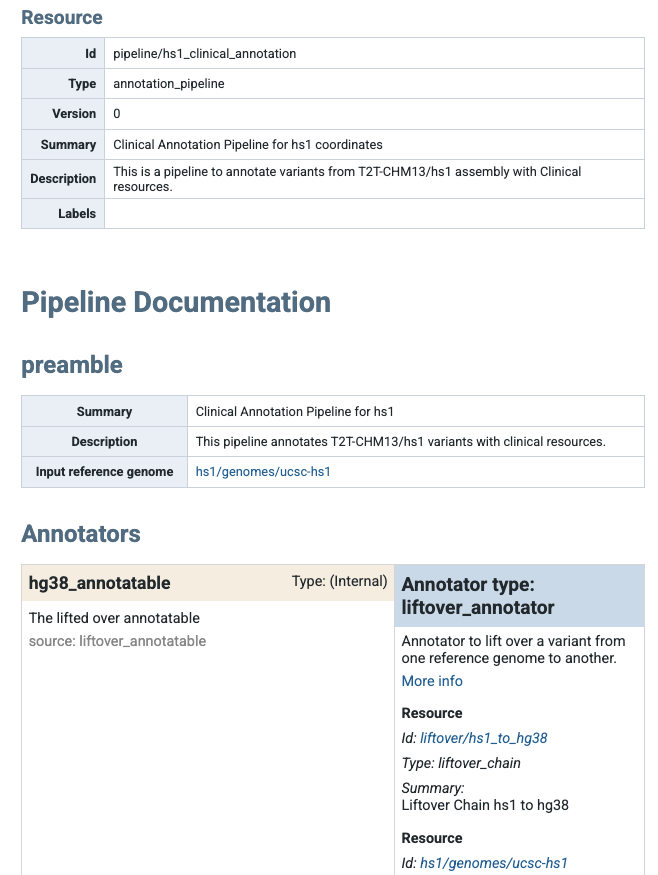
Partial screen shot of the summary html page created for hs1 annotation pipeline in IossifovLab GRR.
The minimal invocation is the pipeline YAML:
annotate_doc annotation.yaml
By default, the tool writes an HTML file next to the pipeline (using its default naming). To choose the output filename, use -o or --output:
annotate_doc annotation.yaml -o annotation.html
Common options:
Option |
Description |
|---|---|
|
Output HTML filename. |
|
Increase logging verbosity. |
|
Write logs to a file. |
|
Control the GRR context used when resolving pipeline resources. |
For a full list of options run annotate_doc --help
Example annotations
1: Effect annotation
Let’s revisit the three variants we annotated in the Getting started on the CLI section. In this section, we will walk through example annotation pipelines for these variants. All annotations will use resources from the public IossifovLab GRR.
chrom |
pos |
ref |
alt |
|---|---|---|---|
chr14 |
21415880 |
G |
A |
chr17 |
7674904 |
TCT |
T |
chr7 |
117587806 |
G |
A |
The input consists of chromosomal positions, the reference allele, and the alternate allele. Create a file named variants.txt with this content in a working folder of your choice.
Our first example annotation pipeline includes a preamble section with high-level metadata and input_reference_genome,
which is used by annotators below unless an annotator explicitly specifies its own genome. Create a file
named annotation_pipeline_1.yaml with the following content:
preamble:
  summary: Demo pipeline
  description: Demonstrates a GAIn pipeline
  input_reference_genome: hg38/genomes/GRCh38-hg38

annotators:
- effect_annotator:
    gene_models: hg38/gene_models/MANE/1.5
    attributes:
    - source: genes
      name: MANE_1.5_genes
    - source: worst_effect
Since there is a preamble section, annotators must be specified under the annotators section. effect_annotator will use the MANE 1.5 gene models and
GRCh38-hg38 as its reference genome (as set by the preamble). The attributes added will be genes (affected genes) and worst_effect across transcripts. The genes attribute is renamed to MANE_1.5_genes in the output. (Because worst_effect is not renamed, it will appear as worst_effect in the output.)
To run this annotation pipeline, enter the following command, which annotates variants.txt using the pipeline in annotation_pipeline_1.yaml:
annotate_tabular variants.txt annotation_pipeline_1.yaml
After the run is complete, there will be a new file called variants.annotated.txt, which includes
two additional columns showing the genes affected by each variant and the corresponding worst effect.
chrom |
pos |
ref |
alt |
MANE_1.5_genes |
worst_effect |
|---|---|---|---|---|---|
chr14 |
21415880 |
G |
A |
CHD8 |
nonsense |
chr17 |
7674904 |
TCT |
T |
TP53 |
frame-shift |
chr7 |
117587806 |
G |
A |
CFTR |
missense |
2: Position score annotation
In our next example, let’s use a minimal annotation pipeline that consists of a single position score annotator using phyloP7way.
Position scores are allele-independent and do not require allele normalization; they simply look up values at the input coordinates.
It is up to the user to ensure that the input annotatables and the position score resource are on the same assembly (for example, hg38).
position_score_annotator:
  resource_id: hg38/scores/phyloP7way
Create a file called annotation_pipeline_2.yaml with this content. This time, specify the output filename to avoid overwriting the annotations from the previous example.
annotate_tabular variants.txt annotation_pipeline_2.yaml -o annotation_2.txt
After the run is complete, a new file called annotation_2.txt will appear with the content below. The phyloP7way column indicates the evolutionary conservation at these genomic positions.
chrom |
pos |
ref |
alt |
phyloP7way |
|---|---|---|---|---|
chr14 |
21415880 |
G |
A |
0.917 |
chr17 |
7674904 |
TCT |
T |
-0.12 |
chr7 |
117587806 |
G |
A |
0.917 |
We note that this minimal example did not specify annotation attributes. As a result, the resource’s default_annotation is used, which (for this resource) selects a single score, phyloP7way.
In terms of output, the following pipeline produces the same result.
position_score_annotator:
  resource_id: hg38/scores/phyloP7way
  attributes:
    - source: phyloP7way
When an attribute is not renamed, it can be written without the keyword source. The following is also an equivalent annotation pipeline.
position_score_annotator:
  resource_id: hg38/scores/phyloP7way
  attributes:
    - phyloP7way
If you want to use the default annotation attributes and configurations of a resource, you can also use the short-hand definition shown below.
Since phyloP7way has a single score, its default_annotation is phyloP7way. Therefore, the following is also an equivalent annotation pipeline.
position_score_annotator: hg38/scores/phyloP7way
3: Allele score annotation
To annotate with allele scores, GAIn typically requires alleles to be
normalized first using normalize_allele_annotator. This annotator converts input variants to a canonical allele representation and produces a normalized_allele annotatable that
downstream allele_score_annotators can use for reliable lookups.
Allele score resources are assembly-specific. The allele_score_annotator does not perform assembly conversion, so you must ensure that the input variants and the allele score resource
correspond to the same reference genome. In this example, we declare the input genome in the pipeline preamble.
Create a file called annotation_pipeline_3.yaml with the following content. The pipeline first produces a normalized allele and then queries ClinVar for two ClinVar fields,
CLNSIG and CLNDN, renaming them in the output for readability.
preamble:
  input_reference_genome: hg38/genomes/GRCh38-hg38

annotators:
- normalize_allele_annotator    # >----->----->----->---┐
                                                      # |
- allele_score_annotator:                             # |
    resource_id: hg38/scores/ClinVar_20251019         # |
    input_annotatable: normalized_allele  # <-----<-----┘
    attributes:
    - source: CLNSIG
      name: clinical significance
    - source: CLNDN
      name: disease name
To annotate with this pipeline, run:
annotate_tabular variants.txt annotation_pipeline_3.yaml -o annotation_3.txt
This produces annotation_3.txt with the requested ClinVar fields:
chrom |
pos |
ref |
alt |
clinical significance |
disease name |
|---|---|---|---|---|---|
chr14 |
21415880 |
G |
A |
Pathogenic/Likely_pathogenic |
not_provided|Intellectual_developmental_disorder_with_autism_and_macrocephaly |
chr17 |
7674904 |
TCT |
T |
Pathogenic |
Hereditary_cancer-predisposing_syndrome|TP53-related_disorder|not_provided|Li-Fraumeni_syndrome_1|Ovarian_neoplasm|Li-Fraumeni_syndrome |
chr7 |
117587806 |
G |
A |
Pathogenic |
CFTR-related_disorder|Cystic_fibrosis|Congenital_bilateral_aplasia_of_vas_deferens_from_CFTR_mutation|not_provided|Hereditary_pancreatitis|Bronchiectasis_with_or_without_elevated_sweat_chloride_1|ivacaftor_response_-_Efficacy |
4: Gene score annotation
Gene score resources provide per-gene metrics (for example constraint or intolerance scores). Unlike position- or allele-based resources, gene scores are keyed by gene identifiers, so a gene score annotator needs a gene list rather than a raw annotatable as input.
Because the input to an annotation run is an annotatable, the pipeline must
first map each annotatable to one or more genes using an effect annotator. The effect annotator can
emit one or more gene-list attributes (e.g., gene_list). These are Python lists of gene
symbols/IDs which can then be passed downstream to gene-based annotators via the input_gene_list setting.
In this example, we use the effect annotator to produce a gene_list attribute and then annotate
those genes with the pLI gene score (probability of loss-of-function intolerance).
Create a file called annotation_pipeline_4.yaml with the following content:
annotators:
  - effect_annotator:
      gene_models: hg38/gene_models/MANE/1.5
      genome: hg38/genomes/GRCh38-hg38
      attributes:
        - genes
        - worst_effect
        - source: gene_list         # >-------->--------┐
          internal: false                             # |
                                                      # |
  - gene_score_annotator:                             # |
      resource_id: gene_properties/gene_scores/pLI    # |
      input_gene_list: gene_list    # <--------<--------┘
      attributes:
        - pLI
In this pipeline, we explicitly include gene_list in the output by setting internal: false.
Otherwise, gene_list can be kept as an internal intermediate attribute that is available for downstream
annotators but not written to the final output. To annotate with this pipeline, run:
annotate_tabular variants.txt annotation_pipeline_4.yaml -o annotation_4.txt
This produces annotation_4.txt with the effect outputs plus the requested gene score:
chrom |
pos |
ref |
alt |
genes |
worst_effect |
gene_list |
pLI |
|---|---|---|---|---|---|---|---|
chr14 |
21415880 |
G |
A |
CHD8 |
nonsense |
[‘CHD8’] |
{‘CHD8’: 1.0} |
chr17 |
7674904 |
TCT |
T |
TP53 |
frame-shift |
[‘TP53’] |
{‘TP53’: 0.9122229533} |
chr7 |
117587806 |
G |
A |
CFTR |
missense |
[‘CFTR’] |
{‘CFTR’: 2.96e-36} |
Gene score outputs are dictionaries mapping each matched gene to its score (for example, {‘TP53’: 0.912…}), to support annotatables with multiple gene matches.
5: Liftover annotation
Sometimes the resources you want to use are available only for a different reference genome build.
In that case, you can use liftover_annotator to convert the input annotatable to a different genome
and expose the lifted-over coordinates as a new annotatable that downstream annotators can consume.
In this example, we start from hg38 annotatables, lift them over to hg19, and then query
an hg19-only position score resource (FitCons i6 merged). The liftover_annotator emits a
built-in liftover_annotatable. We rename it to hg19_annotatable and set internal: false so it is
included in the output table. source_genome and target_genome are shown here for clarity. When the selected
chain resource already encodes the source and target genomes (as labels/metadata), these fields are typically optional.
Create a file called annotation_pipeline_6.yaml with the following content:
annotators:
  - liftover_annotator:
      chain: liftover/hg38_to_hg19
      source_genome: hg38/genomes/GRCh38-hg38
      target_genome: hg19/genomes/GATK_ResourceBundle_5777_b37_phiX174
      attributes:
        - source: liftover_annotatable
          name: hg19_annotatable          # >----->----->----->----->-------->---┐
          internal: false                                                      # |
                                                                               # |
  - position_score_annotator:                                                  # |
      resource_id: hg19/scores/FitCons-i6-merged                               # |
      input_annotatable: hg19_annotatable # <-----<-----<-----<-----<-----<------┘
To annotate with this pipeline, run:
annotate_tabular variants.txt annotation_pipeline_6.yaml -o annotation_6.txt
This produces annotation_6.txt with the lifted-over annotatable plus the hg19 score:
chrom |
pos |
ref |
alt |
hg19_annotatable |
fitcons_i6_merged |
|---|---|---|---|---|---|
chr14 |
21415880 |
G |
A |
VCFAllele(14,21884039,G,A) |
0.707 |
chr17 |
7674904 |
TCT |
T |
VCFAllele(17,7578221,TTC,T) |
0.722 |
chr7 |
117587806 |
G |
A |
VCFAllele(7,117227860,G,A) |
0.554 |
6. Fragment score annotation (CNVs)
A fragment_score_annotator reports copy-number variant (CNV) events whose intervals overlap each
input locus. If you do not specify any attributes, the annotator reports the number of overlapping
CNV events observed in the resource as count.
Create a file called annotation_pipeline_cnv_1.yaml with the following content. This will query the DGV resource.
- fragment_score_annotator:
    resource_id: hg38/cnv_collections/DGV
To run this pipeline, execute:
annotate_tabular variants.txt annotation_pipeline_cnv_1.yaml -o annotation_cnv_1.txt
This produces annotation_cnv_1.txt with the default count column:
chrom |
pos |
ref |
alt |
count |
|---|---|---|---|---|
chr14 |
21415880 |
G |
A |
0 |
chr17 |
7674904 |
TCT |
T |
2 |
chr7 |
117587806 |
G |
A |
2 |
To emit specific fields from the CNV records, add an attributes list. Fragment score attributes
use the attribute.<id> form (for example, attribute.deletion_duplication).
Create a file called annotation_pipeline_cnv_2.yaml:
- fragment_score_annotator:
    resource_id: hg38/cnv_collections/DGV
    attributes:
      - attribute.deletion_duplication
      - attribute.cnv_name
Run:
annotate_tabular variants.txt annotation_pipeline_cnv_2.yaml -o annotation_cnv_2.txt
This produces annotation_cnv_2.txt with the requested event-level fields:
chrom |
pos |
ref |
alt |
attribute.deletion_duplication |
attribute.cnv_name |
|---|---|---|---|---|---|
chr14 |
21415880 |
G |
A |
||
chr17 |
7674904 |
TCT |
T |
lossloss |
nsv574322nsv457659 |
chr7 |
117587806 |
G |
A |
inversionloss |
nsv7405esv3891197 |
7: Gene set annotation
Gene set resources group genes into named sets (for example pathways, functions, or phenotypes).
The gene_set_annotator can (1) report membership for specific sets you select and (2)
emit a combined list of all sets a gene belongs to.
Because gene-set membership is defined per gene (not per raw annotatable), the pipeline must first
map each annotatable to one or more genes. Here we use an effect_annotator to produce a gene_list
attribute that is then passed into the gene_set_annotator via input_gene_list.
In this example, we query a GO gene set collection and request two outputs:
A single membership flag for the GO term GO:0006915 (renamed to apoptosis). If the mapped gene is in that set, the output cell is yes (otherwise empty).
in_sets, a list of all set IDs (GO terms) that the gene belongs to in the collection.
Note that in this pipeline, gene_list is not marked with internal: false, so it does not appear
in the output. It is still produced and used as input to downstream annotators.
Create a file called annotation_pipeline_5.yaml with the following content:
- effect_annotator:
    gene_models: hg38/gene_models/MANE/1.5
    genome: hg38/genomes/GRCh38-hg38
    attributes:
    - genes
    - worst_effect
    - gene_list       # >----->----->----->----->----->----->----->----->----┐
                                                                           # |
- gene_set_annotator:                                                      # |
    resource_id: gene_properties/gene_sets/GO_2025-07-22_release.          # |
    input_gene_list: gene_list  # <-----<-----<-----<-----<-----<-----<-----<┘
    attributes:
    - source: "GO:0006915"
      name: apoptosis
    - in_sets
To annotate with this pipeline, run:
annotate_tabular variants.txt annotation_pipeline_5.yaml -o annotation_5.txt
This produces annotation_5.txt with the effect outputs plus the requested gene set annotations: